A small place for the things in between.
Door codes, claim numbers, the restaurant a friend recommended. Share it in, and ask for it later. Hirsla keeps it, and your phone finds it again.
Works on iPhone and iPad with iOS 26 or iPadOS 26. Best with Apple Intelligence (iPhone 15 Pro, or iPad with M1 or A17 Pro, and newer). In 17 languages.


Too small for a note, too useful to lose.
The door code for the holiday flat. The parking level. The claim number on the letter you photographed on the kitchen table. Too small to deserve a folder, and exactly the things you go looking for at the worst moment.
Door code, holiday flat
4471, key box left of the door
3 facts · 4 Oct
Where the car is
Level 3, row C, by the blue pillar
1.8 MB · today
Claim number
Read off the letter, with the date
2 pages · 1 Oct
The place Marco mentioned
Rosenweg 12, Old Town
4 facts · 6 Oct
Sample cards and sample answers, not real data.
Three beats, and you are done.
-
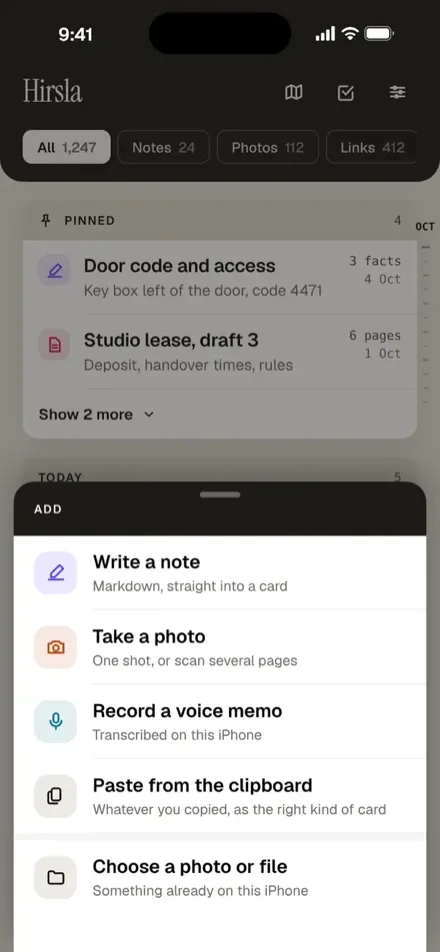
01
Share it.
Tap Share in any app and pick Hirsla. Nothing to name, no folder to choose.
-
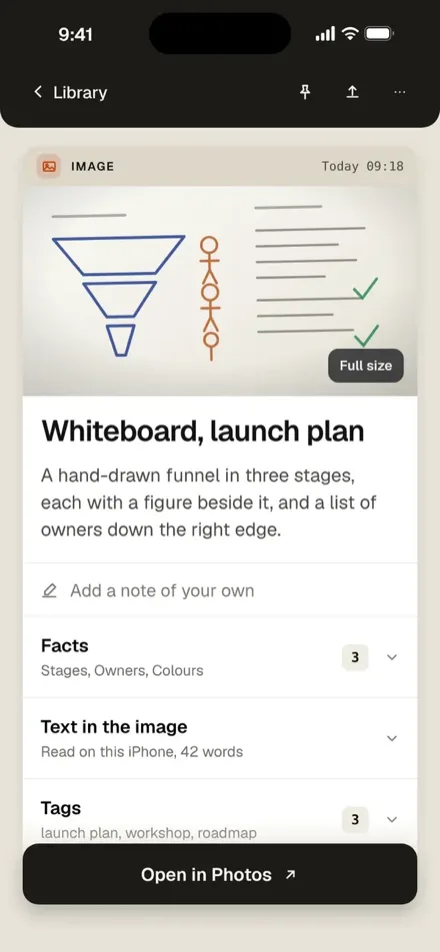
02
Your phone writes the card.
A title, a short summary, and the details that matter: codes, addresses, deadlines.
-
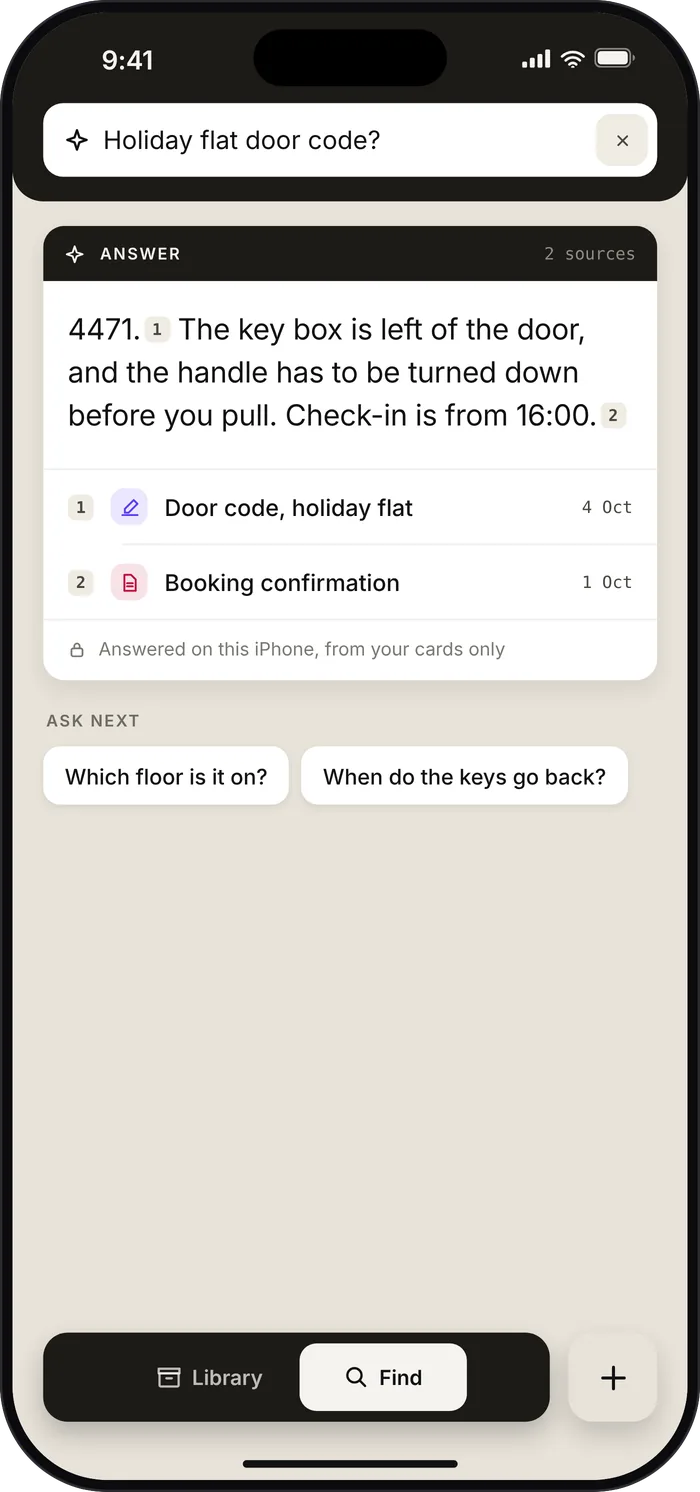
03
Ask for it later.
Type or speak it in plain words. You get the answer and the cards it came from.


Every sentence shows where it came from.
Type or speak it in plain words. The answer comes from what you saved, and each sentence carries a small number. Tap it, and the card it came from opens with the passage the answer used marked. A sentence your cards do not back is left out, and if nothing matches, Hirsla is built to say so instead of guessing.

More of it open.
Hirsla runs natively on iPad. In landscape, a shelf with your card types sits on the left, the list in the middle, and the open card beside it. In portrait, the shelf folds away and the type chips come back above the list. A narrow window gets the iPhone layout.

The answer beside its source.
Ask on iPad, and the source opens next to the answer, with the facts the answer used marked. The numbers step through every source without leaving the answer.

Drop it in, drag it out.
Drop a photo, a link, or a file onto Hirsla to save it, from any window, Split View included. Drag a card out, and it arrives as its original: a PDF as the PDF, a note as a Markdown file. The keyboard works too: Command-K to ask, Command-N for a new note, and the rest in the menu.

iPhone Duo, open and closed.
Open, iPhone Duo gives Hirsla two pages: the list on one, the card on the other. Half open, the answer sits on one page and its source on the other. Closed, the same card stays open on the outer screen, with the system’s own toolbar and tab bar on the side.


Sample cards, not real data.
Write it by hand, find it by its words.
Add › Draw opens a page to draw on, with Apple Pencil on iPad and a finger on iPhone, using Apple’s own drawing tools. There is no save button: it is kept as you draw.
The handwriting is read on the device and becomes the card’s title, summary, facts, and tags, so you find the drawing by what you wrote. A sketch without words is titled by its date. Continue drawing picks it up again, on either device.


Sample cards, not real data.
No account. No analytics. No server of mine.
Stays on your iPhone or iPad
- Your cards, their text, their summaries, and their facts
- Reading, search, and Ask, handwriting included, all on Apple’s on-device models
- Voice memos, transcribed on your device once the speech model is installed
- Deleted cards, recoverable for 30 days
- Backups of your own library, with Restore Missing Cards if one goes astray
Leaves your iPhone or iPad
- Saving a link loads that page
- A place is looked up in Apple Maps
- Purchases go through Apple
- iCloud sync goes through your own iCloud, and you can turn it off
- A problem report you choose to send carries diagnostics and recent logs
Nothing goes to me or to an AI company, unless you choose to send feedback or a problem report.


No bars. Same app.
Aeroplane mode on, the whole way through
- 01
Save something, with no connection
The card is saved before the sheet closes.
- 02
The card is there
Read on the phone, with its title and summary written.
- 03
Ask, and it answers
From your own cards, with the cards shown underneath.
The AI runs on your iPhone or iPad. Once Apple Intelligence is set up, your cards, search and Ask work without a connection. Saving a new link needs one, to load the page. Sample cards, not real data.


If you can share it, it fits.

- Links
- Text and notes
- Places
- Photos and scans
- PDFs
- Voice memos
- Calendar files
- Drawings
- Apple Watch
- Record a voice memo from your wrist
- Widgets
- Lock Screen and Control Centre actions
- Map
- Where you saved things, if you turn it on
- Calendar events
- Dates picked out, with a countdown


The map, if you want it.
The map is off until you turn it on. Then everything you save notes where you were, so the library doubles as a map of the week. Photos you pick keep the place they were taken, and Apple Maps looks up the address.


Voice, from the wrist
Record a memo on Apple Watch. It keeps recording with your wrist down and becomes a voice card on your iPhone.


Free to download, no ads, no subscription.
The first 100 cards are free. If you need more room, you buy it in packs, as often as you like, from +100 cards for $2.99 up to +5,000 for $49.99 (prices vary by country). Room adds up and does not expire.
Past 100, new items are still saved, and Hirsla writes them up once there is room. Your cards live on your phone, and export is never locked. Room is tied to your Apple ID. On a new iPhone signed in with the same Apple ID, it comes back by itself. If it does not, write to me.
It works on iOS 26 and iPadOS 26.
The full experience, with written titles, summaries, and Ask answers, needs Apple Intelligence: an iPhone 15 Pro or newer, or an iPad with M1 or A17 Pro or newer. Here is what changes without it.
With Apple Intelligence
iPhone 15 Pro, iPad with M1 or A17 Pro, or newer, turned on
- A written title and a short summary on every card
- Facts pulled out: codes, addresses, deadlines, prices
- Ask answers your question in a sentence, with its cards
Without it
Any other iPhone or iPad on version 26
- Still saves, finds, and keeps everything
- Simpler titles and summaries
- Ask shows the best cards with the sentence that answers
- Cards are quietly read again in full if it arrives later
The app is in 17 languages, and Apple’s on-device model writes cards in any of the same 17. There is no Mac or Android version.
It replaces nothing.
Notes is still where you write. Photos is still where your pictures live. A bookmark tool is still where you keep the long read for Sunday. Hirsla is for the things that never quite belong in any of them, and it is small on purpose. Keep what works.
One finished small thing.
I am Niklaus. Hirsla is my first native app, built with a team of AI coding agents, one decision at a time.
I kept losing small things: a door code, a claim number, the restaurant a friend mentioned. Notes wanted me to file them. Bookmark tools wanted me to remember I had saved something. Other tools I tried wanted an account, a subscription, or a connection, and I wanted widgets and an Apple Watch app too. I did not want a second brain. I wanted one finished small thing that does one job.
Hirsla is also the small version of a view I hold as a product leader: useful AI does not need your data on someone else’s server.
I would like to know what you lose most often: codes, receipts, or places? Tell me on LinkedIn
Niklaus
The ones I would ask.
What if the AI gets it wrong?
It can. Every answer shows the cards it came from, so you can check. If nothing matches, it is built to say “no answer”.
What happens at the limit?
Sharing still works, from the share sheet, the Watch, the widget, and the camera. New things are kept, and Hirsla reads them once there is room, in the order you saved them. Until then you can open, play, edit, and export them, and find them by their title, file name, or link. Everything already read keeps working.
What if I get a new iPhone?
Your cards come with you: sync is on by default, so they arrive through your own iCloud, with no account in between. Room is tied to your Apple ID and comes back by itself on the new phone, with no button and no sign-in. If it does not, write to me and I will sort it out.
Does it work on iPad?
Yes. Hirsla runs natively on iPad, with the list and the open card side by side, drag and drop, and keyboard shortcuts. Your cards sync through your own iCloud, and room bought with your Apple ID counts on both. There is no Mac or Android version.
Can I get my data out?
Yes, any time. Export everything writes Markdown files with your originals, and it is never locked behind a purchase. Hirsla also keeps backups of your library, and Restore Missing Cards reads one back without overwriting anything.
Who is behind it?
Me, Niklaus, in Switzerland. Hirsla is a private side project and has nothing to do with my employer.
Share it. Ask for it later.
Hirsla is on the App Store now. The link opens it on your iPhone or iPad.
Get it on the App StoreApple Intelligence, Apple Pencil, Apple Watch, Apple Maps, App Store, iCloud, iPad, and iPhone are trademarks of Apple Inc. Hirsla is a private side project and has nothing to do with my employer.